How to Plan a Road Trip

Road tripping is one of our favorite ways we like to explore the great outdoors, especially national parks - and we’re determined to see all of them. I’m also super organized and every road trip of ours usually starts with Google Maps and a spreadsheet with the budget.
We recently went on a road trip around Washington (particularly the Olympic Peninsula and Mount Vernon areas) for five days and then made our way up to Vancouver, Canada for a visit. This entire area is incredibly gorgeous (if you go during the right time of year) and I’m going to be writing a travel guide for them soon, so be on the lookout!
I thought it would be helpful if I shared our road trip planning templates so you can use them too to plan your own. You can copy them and customize it to your trip!
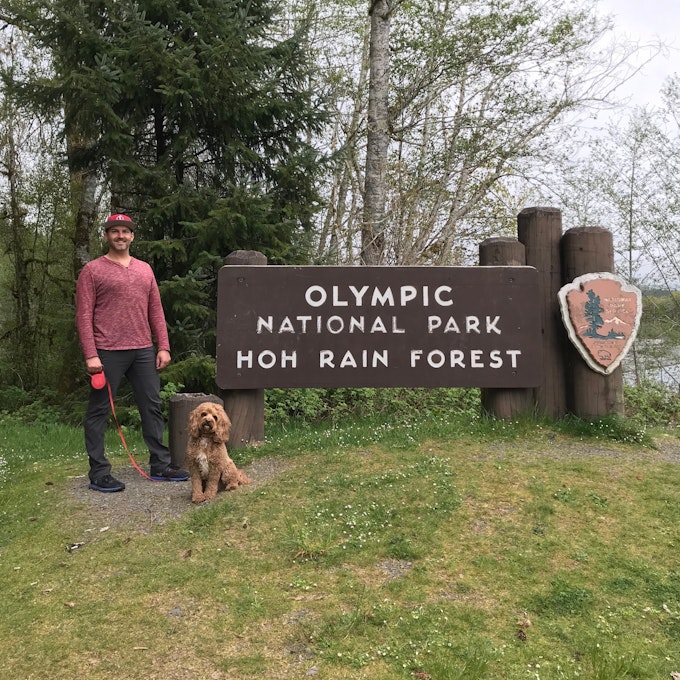
First, I start with a Google Map. On here, I create an initial ‘layer’ and start putting all the places we want to go. After we consider logistics and how many days we have, I add additional layers for each day and then drag the pins to certain days that make the best sense for the route we’ll take. I label, color code, and add fun icons and photos with descriptions as well.
Tip: Save your map “offline” so you can access it without data too (a.k.a. when you’re driving in the middle of nowhere).
Go HERE to get the Google Map!
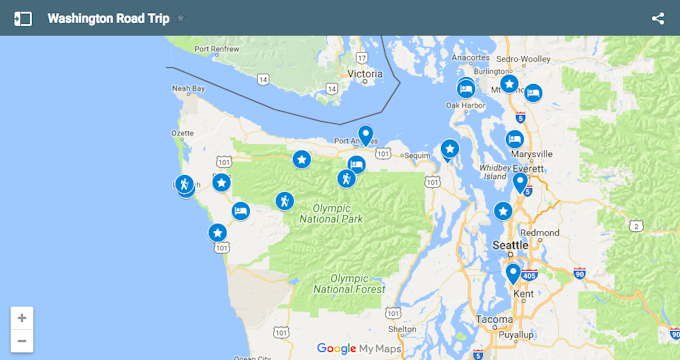
Next, I create a Google spreadsheet with the budget. On this spreadsheet, I also included a separate sheet at the bottom with the daily route in case that view is easier for you than the map. Use whichever you like best, or both!
Go HERE to open the spreadsheet. (Tip: if you log into your Google account you can go to ‘file’ → ‘save a copy’)
Last, I research adventures along our route. Part of a road trip is stopping along the way to explore! I use The Outbound to look up adventures based off our route I put in Google Maps. I also use Caltopo for looking up detailed topographic maps for our hikes/backpacking trips.
We save up for all of our trips before we go on them. If you want to know how we do that and get a detailed explanation on where the money “lives” until the trip, hop over to THIS post where I explain what we do in detail in the “budgeting software” section.
Now, you just need to pack! If you need help with that, you can find my Ultimate Packing Checklist HERE (hint: it’s customizable too)
If you plan for road trips in a different way, let me know how you do it!